Chrome Browser Tricks


 Chrome Browser Trick 1:-

Instead of opening a single website, you can open multiple pages at startup in Chrome browser. To open several pages at startup follow this method:-

1.at the upper right corner of the Chrome window and click on the "wrench" icon (Customize and control Chrome).

2.after that select the "Options" and select "option"  and then select the "on startup... open  the following pages"
Option  from the 'Basic' tab.to add The pages  which you see when chrome start, you can manually enter the URL of the site or simply click on "Add" button  and you  find  a list of web sites,   while surfing the internet.

 3. Choose the pages what you need. Now the site is opened automatically when you open the chrome.

Chrome Browser Trick 2:-

To check the time taken to load your site, you can use this trick.
Follow my steps:

1. Simply use the right mouse button on a Web page


2. select the "Inspect Element" option.

3.Then you know just select the "resource" tab and be able to know the  load times on this website.

This trick is especially useful for Web developers.

Chrome Browser Trick 3:-

For quick access  to any site  you can  turn the site to  "desktop applications" follow my steps:

1:  simply click the ‘wrench’ icon (Custom Chrome and control) in the upper right corner of the window of chrome.
                              
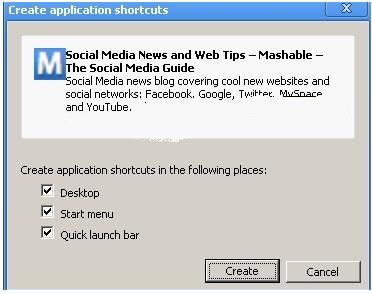
2.And select " Tools"  and choose " Create application shortcut " option. , a window  will appear from which you can choose  where you want to create the shortcut. Just select" Desktop and  you will see the   shortcut will be created  on your desktop as  an icon.

3.Now just double-click on the icon to open the site.

Chrome Browser Trick 4:-

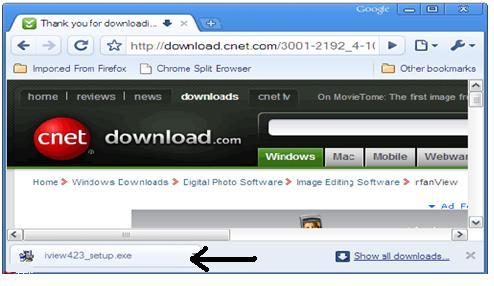
After finishing Any download ,if you want to copy it to any  folder on your computer, follow this easy trick  to use the Chrome browser to do this
      

1.simply click on the mouse to the  downloaded files and the drag it to the folder  where you  want to copy that  file

2.Then easily release the mouse.  it will Copy  the file to the folder on your pc.

Chrome Browser Trick 5:-

If you  want to auto complete address in the address bar, you can use the "auto-fill" feature of chrome browser.

1.In order to do this go to the upper right corner of the Chrome window and click on the "wrench" icon (Customize and control Chrome)

2. select the "Options" menu.


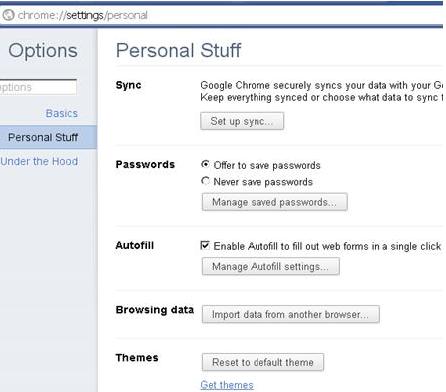
3.Then select "personal stuff", click the "Autofill" option.

4.Then enter your contact information by clicking the "Add address" option.

 by using This trick you don't  give the address over and over again.

Share/Bookmark

Windows XP Tricks


 "Windows XP" operating system is used the most popular and widely used around the world. Windows XP is a great blessing for humanity, to improve the living standards very easily. I have some Windows XP tricks to help you get the best result.

Trick 1:-


 In case that you want to see your desktop icons transparent just follow this:-

1.In the beginning you have  to go to "Control Panel"

2.Then double-click on the "System" icon

3.Then simply click on the "Advanced" tab. In the Performance area, click on the tab "Settings" and select the visual effect.

4.Then simply choose the "Use drop shadows for icon labels on the desktop"

5.Then simply press the "OK".

With this trick, you may be able to show your desktop icons transparent. check out ths if yout not beleive.

Trick 2:-

If you do not want recyle bin for use or deletion of files for storage, follow these tips   to remove recyle bin from your desktop.

1.To do this, first run  and write "regedit" and hit enter.

2.Go to: HKEY_LOCAL_MACHINE/SOFTWARE/Microsoft/Windows/CurrentVersion/Explorer/Desktop/namespace.

3.Click now,  'recycle bin' string on the right

4.select the  "Delete" option from the  screen  and  click 'OK' button for delete recylebin.

Trick 3:-

With this trick, you may be able to rename your "Recyle Bin"

1.Simply open "regedit" and go to:

HKEY_CLASSES_ROOT/CLSID/{645FF040-5081-101B-9F08-00AA002F954E}

2.After that rename the recyle bin   whatever  you want.
(Note: Do not use the quotation marks  to your name)

Trick 4:-

If you want to run your private files from your computer, you can follow this tip.

1. At first  go to  "My Computer" and double-click on the my computer icon  to open  "Windows" program for this trick.then go to windows drive where your windows is insalled.

2.Then double-click on the Document and Settings folder, double-click again on your user folder. Now right-click the folder that your user profile and select  from the drop-down list.

3.It is shortly going to the Sharing tab, and select  the make this folder private so that only I have access to it check box.

Trick 5:-
Do you want to know the IP address of your Internet connection:

1.simply click on the Start button and then click Run.

2.Then just type "cmd" and click the OK button in the Run window.

3.Then write "ipconfig".

With this trick, you know  IP address of the connection.


Trick 6:-
 Do you want to copy files and folders to a CD, you can follow this trick:-

1.To do this, you must first insert a blank recordable CD into your CD burner.

2.Next, open My Computer and select files and folders that you want your CD to copy.

3.Then copy the file to select / copy the selected items from the button on the left side of the window.

4.Then click on the CD, copy the item and click the Copy button.

5.Then simply open My Computer and double click on the CD, click on "Write these files to CD" from "CD task on the left side of the window.

6.Finally, Windows displays the CD Writing Wizard. Follow the wizard direction to write .Due to the action above, you can copy files and folders,to the blank CD.


Trick 7:-

If you want to view hidden files on your hard drive follow below strps:

1.you should go to menu bar then click on "tools"

2.then  click "Folder Options"  then click "view" after that  click the chechbox "Show hidden files and folders"

3. Then  just press the OK to confirm.

Now all files and folders from your hard disk can be viewed by you.
Hey  you like this post.Comment for this post.
Share/Bookmark

Add Blogger Share Button And Power Saving Mode

A blog is a platform in front of everyone who sends you the privilege of their thoughts, share ideas for the blogger comments, news, and newspapers around the world.  I'll give two basic things to  get bloggers results to all bloggers.


To add " bloggger Share  buttton":-

If you add blogger share buttton it will be easy to add  your blog in Twitter, share in facebook
or mail  it  for  your  blog  visitors. To add  this  feature,  follow the below
steps:-

* login to Blogger then go to Design html after that go to Edit html                                                       

*Click on the "expand widgets"in  template.                                                                                      

*Add the line anywhere you want the widget ,Add it after   anyone of the line                                                                                                                                     


*Add it after anyone of the line,                                                     


*If you can not find this line in the template then  find the line,

*And add this code,
*Save the template.
*In case that  you don't see this feature in your blog, then check  you have activated this option, go  to Blogger dashboard then go to Design after that Click the ‘EDIT’ button of the Blog post section


*Run a Blog In The Energy Saving Mode

If your blog visitors are inactive, your blog in the power saving mode, just like below this screen.


To enable this power saving mode to your blog :-

*Log into Blogger and go as follows,   Dashboard then go to Design after that go to  Edit HTML.
 after that    find the code "</ head>" tag by scrolling down your template..
 Copy the code  and paste before the </ head> tag,


(If you use another JavaScript library, add this code in place of the old code that uses this standby engine uses “jQuery Javascript library”)


*To determine the "Time Of Inactivity" that you start the engine, you must write "?time=a". a=  is the number of seconds, write the  code to set the time of  80 seconds.

I hope this post is very useful  to you.


Share/Bookmark
Related Posts Plugin for WordPress, Blogger...