Showing posts with label Alertpay. Show all posts

Verify Your Alertpay Account Via VCC

You can also verify your Alertpay with  verification VCC. Pricing details are below-

For Alertpay verification:
Payment via Alertpay: $12
Payment Via Liberty Reserve: $11

Details: 
= For verifying AlertPay account only.
= Anonymous - use with any name and address worldwide.
= Will come with only enough balance to cover AlertPay verification charge.
= One time use - cannot be used to verify multiple accounts.
= Does not support AlertPay withdrawal/deposit.
= We will provide the exact AlertPay charge amount once it appear on the VCC statement.
= Available as Visa and MasterCard.

With a purchase of AlertPay VCC, you will receive the following details:
i) Visa or MasterCard 16-digit account number.
ii) 3-digit security code known as the CVV/CVV2.
iii) Expiration date.
iv) AlertPay charge amount.



Share/Bookmark

Deposit alertpay Dollar via Credit Card

If you want to deposit alertpay dollar via credit card you need below things

1. your  personal pro alertpay account have to verified by credit card. 2.you need two acount for deposit alertpay dollar.

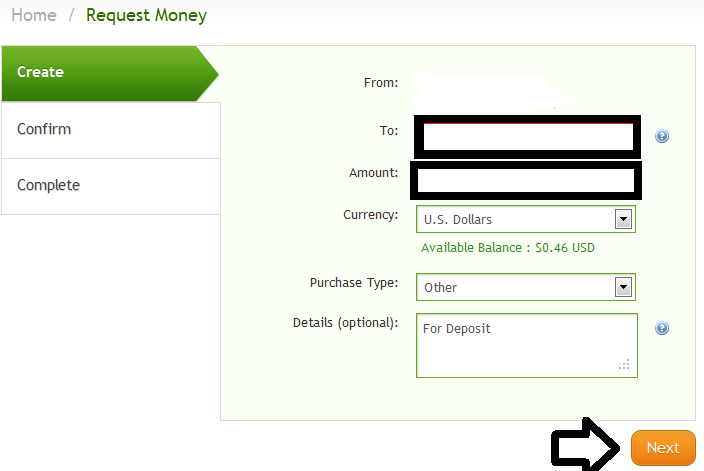
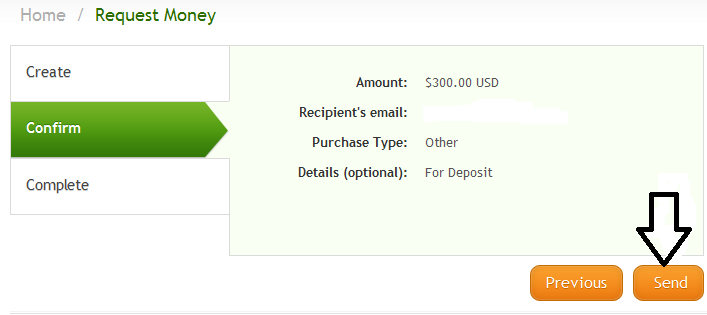
Now  lets see how can u deposit you alertpay dollar from credit card. For deposit alertpay dollar  login in to your 1st alertpay account and give  a money send request  to  your verified alertpay  account.


Please again see details for confirm

 Now you can see your request  has been successfully sent


Now complete the 2nd step
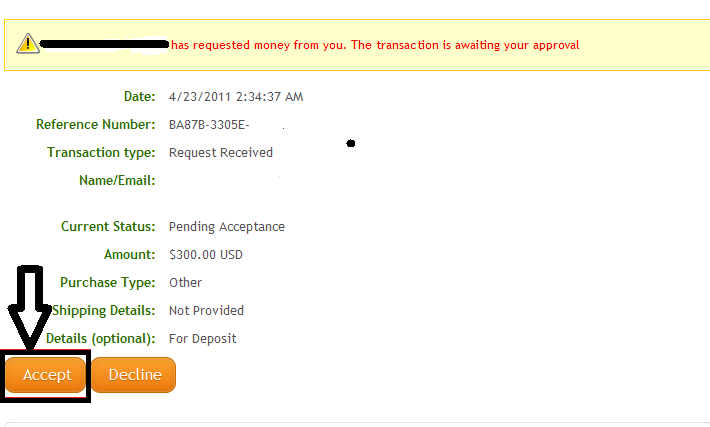
  Now  you have to log in to  your verified alertpay  account .Here you can see a request now click pending Acceptance.
Now you have to accept the request.When you accept the request  you can see the below picture in your browser.


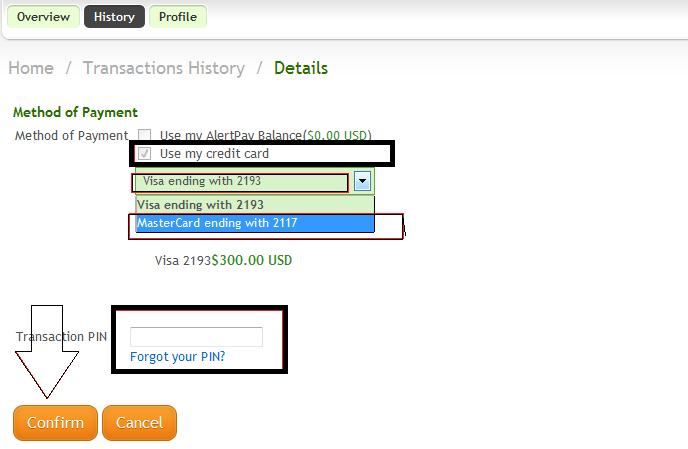
Now select your credit card and give your pin number.

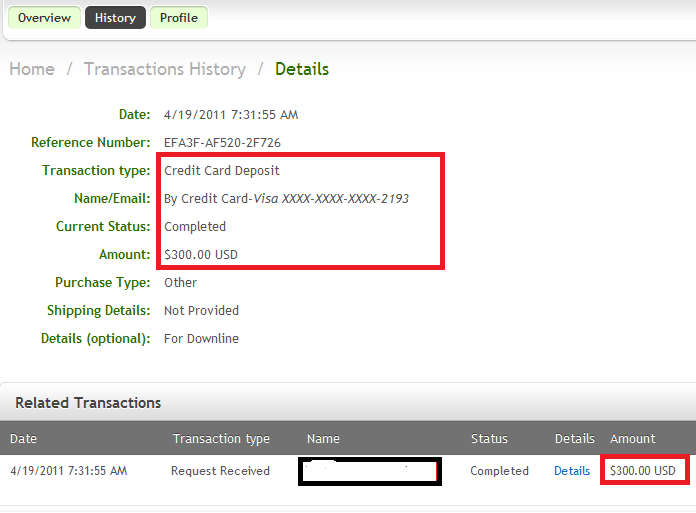
 If your credit card have no problem  i hope   the transaction will complete.


Share/Bookmark

How To Verify Your Alertpay Account!

Alertpay is a Good e-curency  because its supports in bangladesh.Then when i try  to verify my alertpay account i saw many way to verify my account .i select credit card verification.i want to use my payoneer card for verify my account which i got from odesk.
Then for verify i select add a credit card


  After add the card i have to verify it.
For verify i go to verification menu then select verify card option.

 Then i fillup all of my information in the box.

 Then i select next and i  see this message.

 This said i will get a special code and its need for next  work.Then i have to wait for 2-3 working days.after wait then i login  to my payoneer account and i see that they give me the code or not.after that i see they give me a code which is contain four words.
  Then i save my code and log in to my alertpay account.then i go to verification and place the code in right place correctly.


  yeeeeeeeeeeeeeeeeeeeeesssssssssssssssss  my account is verified.
  I verify my account and when i need taka i will cash it.there is different way to cash alertpay dollar.


Share/Bookmark

Earn With Alertpay

                                           Earn with Alertpay:


You can earn fair amount of money with alertpay by referring others .


                * Referral Earnings : $5/ $10. Referral must qualify before you are credited.


                * Referrals must open an AlertPay Personal Pro or Business account.

                * Referrals must transact $250.00 (sending and/or receiving).

                * After your 10th referral, they will pay you $10.00 USD a referral.

                * Self-referrals, or referrals from the same IP address, will not be paid out.

                * Your referral bonus will be paid to your account 10 days after your referral fulfills the qualifications


Share/Bookmark

Alertpay

                                                           ALERTPAY  PREVIEW

AlertPay is an internet payment service which allows the users to send and receive money online. It is safe and the money transfer is very fast.
AlertPay is a Canadian based company that was established June 19, 2005.

AlertPay Accounts:

AlertPay offers its customers two types of accounts to choose from - Personal and Business accounts. Personal Account is again of two types - Personal Starter and Personal Pro.Let’s see each one in details.
1. Personal Pro Account
2.Personal Starter Account

Personal starter:

The Personal Starter account is just right for beginners. It uses top grade security features and thus ensures the safety of the user’s personal information. Using this account the user can send money to friend, family or anyone who has an email address.

This account allows people new to online payment processing to:

    * Shop safely online
    * Send and receive money free of cost
    * Make credit card payments.
    * Its monthly receiving limit is $400.
    * Its cumulative lifetime receiving limit is $2000.

Personal Pro Account:

The Personal Pro account is for people who shop or sell regularly on the internet.

A Personal Pro account offers the access to a number of business tools to help you succeed online.

    * Low receiving fee of 2.5% + $0.25 per transaction.
    * Accept credit card payments.
    * Access to Business Tools, such as "Buy Now" and "Subscribe Now" buttons and Instant  payment  Notification.
    * Send mass payments to groups of people.

AlertPay Business Account:
The Business Account, as the name suggests, is for people who do business online. The account is appropriate for all the business requirements.

With this account the user will have access to many online business tools to help the business grow online and the user will also have unlimited emails associated with the account. This account has low transaction fees of 2.5% + 0.25 per transaction (additional fees may be applied for specific industries).

The features of this account are:

    * Business can be conducted under your company name.
    * Low transaction fees of 2.5% + $0.25 per transaction.
    * It accepts credit card payments.
    * Manages multiple online businesses with one AlertPay account.
    * Use our "Buy Now" and "Subscribe Now" buttons for one-time and recurring payments.
    * Easy to integrate into third-party applications.
    * Send payments to multiple people at once.

AlertPay Charges:

AlertPay offers services at very low transaction costs. (Receiving fee of 2.5% + $0.25 per transaction for Personal Pro.) There is no charge to open an account.

AlertPay Accounts:

How to get started with AlertPay?

   1. Go to www.AlertPay.com
   2. Create your AlertPay account by choosing your country and type of AlertPay account.
   3. From there, go to a page that asks for your basic personal information — your name, address, telephone number and e-mail address. Once you confirm your account, a sign-up confirmation will be sent to you through e-mail.
   4. Then open your e-mail account and your will see confirmation e-mail from AlertPay. Click on the link to confirm your e-mail address.
   5. After this you have to login and then you will be directed to your AlertPay account page. You will be asked for a secondary password, this is for your transactions.
   6. Now familiarize yourself with your new AlertPay account interface. Then verify your account.

What is the need for Account Verification?

Account verification is for protecting the members against any possible fraud. Account Verification identifies who you are as a KYC (Know your customer) policy. To identify themselves the members have to provide documents. AlertPay can ask the user for verification at any time.

Advantages of the verification - The verification increases the security of AlertPay’s network which allows the confirmation of its users. It allows to carry out high amount transactions easily without any suspicious eyes

Withdraw money with AlertPay:
You can withdraw your money from your AlertPay account by the following methods:

    * Bank Transfer
    * Cheque
    * Bank Wire

Incase where AlertPay does not offer banking services for some countries, the user can withdraw only by check. The check will be in US Dollars. Also Bank wire withdrawal is available only in USD, EURO and GBP currency.


Share/Bookmark
Related Posts Plugin for WordPress, Blogger...