How to make great blog header

Yay! I did it. I changed the look of Blogger Sentral blog header. Now instead of boring, flat, amateurish looking title text, I’ve upgraded it to a 3D, polished look –more pleasing to the eyes than the previous one (at least I think so).
It’s not as hard as I thought. At one time I thought of using GIMP to make it, but the lack of good looking fonts stopped me half way. I know fonts can be imported into GIMP, but.. too much of a hassle just to pimp the title.
I was just about to give up with this make-my-blog-title-look-good thing, until yesterday that is.
Yesterday I found this cool site, appropriately named Cooltext.com. It’s a free online graphics generator, no need to sign-up or anything. I made mine with just a few simple steps.
So today I’m going to write about how to make or design a blog title and and then replace the existing title with it. Here are the steps:
  • Design the blog title using Cooltext.com.
    1. Choose your logo style, there are many styles available. Choose the one you think best for your blog. You’ll then transferred to Design-Your-Logo page
    2. Here you choose the font, text size, colors etc. You also need to specify the output file format.
    3. After specifying all the parameters, click on Render Logo button, wait for a while and then wallah, your text comes out.
    4. Download it. If you don’t like it you can edit it, over and over again.
  • Replace the existing title with the new one.
    1. Go to Dashboard > Design > Page Elements
    2. Click the Edit link at bottom right hand corner of Header widget box.
    3. Select Image > From your computer. Click Browse to select the file that you’ve downloaded. Under Placement, select “Instead of title and description” option.
    4. Click save, and then View blog.
    Hey, that’s it. Enjoy!

Share/Bookmark

Check blog speed, ranks, backlinks and broken links

Yes now you can check your blog page loading speed, Google Pagerank, Alexa rank, backlinks, broken links, reciprocal link and meta tags right here on Blogger Sentral. I have made a special page containing tools to help you check some of your blog SEO metrics. Click SEO TOOLS tab on the navigation bar to access the tools. Below is the list of available tools:
  1. Speed tester Check page size and loading speed.
  2. Rank checker Check Google Pagerank and Alexa rank.
  3. Backlink checker List out all backlinks to your domain or web page.
  4. Broken link checker List out all outbound links in your web page and identify the broken ones.
  5. Reciprocal link checker Check whether your link partner is still linking back to your site.
  6. Meta tag checker Extract your web page's meta information and tags.
Just enter your domain or your web page URL in the appropriate text box and click Check! button. Results will be displayed below the text box.
All tools are provided and hosted by iWEBTOOL.
Enjoy!

Share/Bookmark

Submit site/blog to DMOZ (Open Directory Project)

DMOZ is the directory of Open Directory Project (ODP), the largest human edited web directory of the Web. The ODP powers core directory services for some the most popular portals and search engines, including AOL Search, Netscape Search, Google, Lycos, and HotBot, and hundreds of others.

Being listed in DMOZ is like an endorsement of your website quality. From a SEO (Search Engine Optimization) point of view, a link from DMOZ brings more trust and authority than most sites. DMOZ is not as highly regarded as it used to be, but to have an inbound link from it is still considered good SEO nonetheless.
Getting listed is very difficult, it could take months, or even years. Blogger Sentral did pretty well actually, it only took us just a little over a month. Click this link to see Blogger Sentral on DMOZ. Update Apr. 2011: As it turns out this blog has disappeared from the list. I don't know why. I will get it re-listed, hopefully.
You can submit your blog too, submission is free. But going ahead with it, you might want to read the submission guideline and FAQS about suggesting your site to DMOZ first.
Here is how to submit your blog to DMOZ.
  1. Go to DMOZ.org and proceed to the category that you want to add your blog to.  
  2. Once inside the category, click the Suggest URL link. dmoz category-suggest url is on top right corner
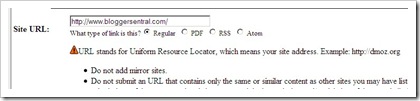
  3. Enter your blog url, blog title, blog description and email address as required.
    submit dmoz-this is where you enter site url submit dmoz-submit dmoz-this is where you enter site name
  4. Enter the captcha and click Submit button.
  5. That’s it,  that was easy.
  6. Enjoy! hmm on second thought … Pray and WAIT (this is the hard part).
By the way, have you submitted your blog to search engines? Read Submit blog to Google, Yahoo and Bing if you haven’t.

Share/Bookmark
Related Posts Plugin for WordPress, Blogger...